Prerequisites
Before setting up, grab your Poku API key from the Poku dashboard. You’ll need it to enable the agent toggle in your workflow.How it works
1
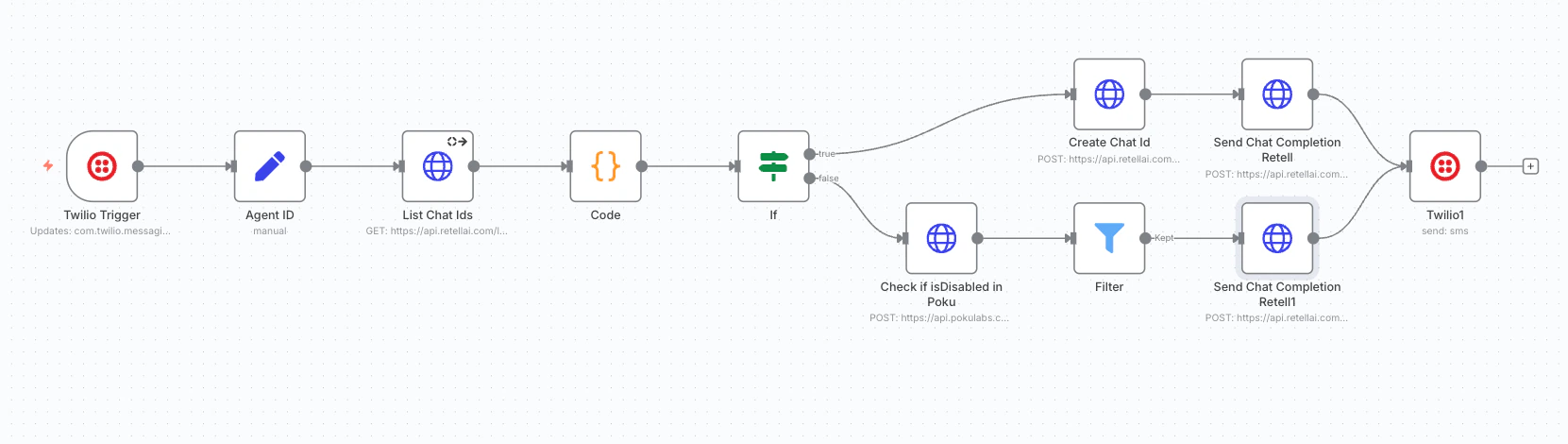
Incoming Twilio message
Incoming Twilio messages arrive at your n8n workflow.
2
Check for existing conversation
The workflow checks whether a conversation already exists for the incoming phone number:
- No existing conversation — a new chat is created.
- Existing conversation — the chat is updated with the new message.
3
Poku toggle check
Poku checks whether the agent is enabled before forwarding the message to your Retell agent.Agent OFF — the workflow stops; the message is not forwarded to the agent.