Documentation Index
Fetch the complete documentation index at: https://docs.pokulabs.com/llms.txt
Use this file to discover all available pages before exploring further.
Poku forms let your AI agent collect structured data from a recipient mid-conversation or mid-task. The agent sends a unique Poku form link, the recipient fills out the form, and the response comes back to the agent via HTTP response or to your webhook.
How it works
- Your agent sends a form
- The recipient receives a link and opens the form in their browser
- They fill out the fields and submit
- The content is returned in the HTTP response if the form was filled out within the
waitTime window. Otherwise, the form response can be delivered to your webhook within the followUpTime window.
curl -X POST https://api.pokulabs.com/forms/sms \
-H "Authorization: Bearer <your-poku-api-key>" \
-H "Content-Type: application/json" \
-d '{
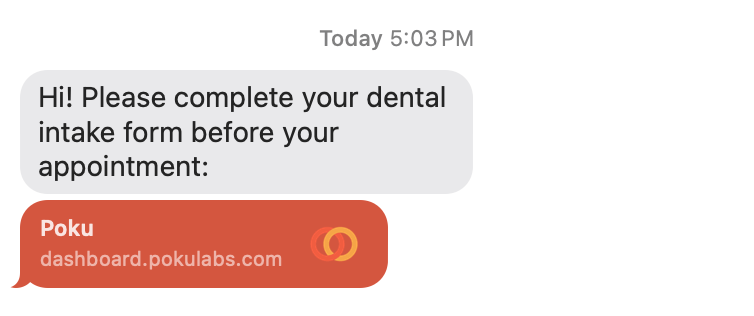
"message": "Hi! Please complete your dental intake form before your appointment: {{url}}",
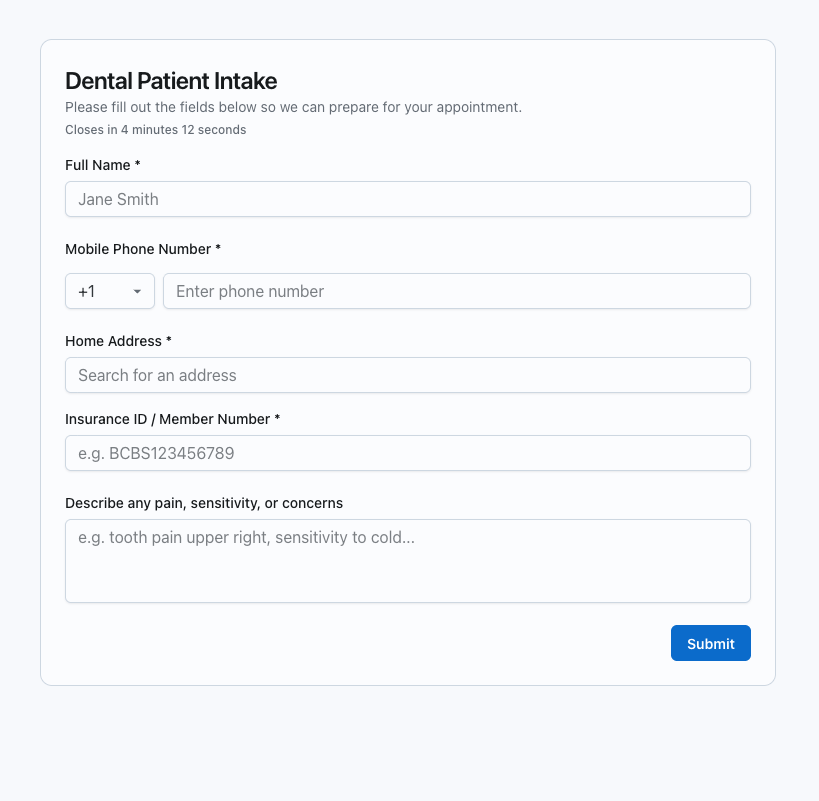
"title": "Dental Patient Intake",
"description": "Please fill out the fields below so we can prepare for your appointment.",
"fields": [
{
"id": "name",
"label": "Full Name",
"type": "text",
"required": true,
"placeholder": "Jane Smith"
},
{
"id": "phone",
"label": "Mobile Phone Number",
"type": "phoneNumber",
"required": true
},
{
"id": "address",
"label": "Home Address",
"type": "address",
"required": true
},
{
"id": "insurance_id",
"label": "Insurance ID / Member Number",
"type": "text",
"required": true,
"placeholder": "e.g. BCBS123456789"
},
{
"id": "issues",
"label": "Describe any pain, sensitivity, or concerns",
"type": "textarea",
"required": false,
"placeholder": "e.g. tooth pain upper right, sensitivity to cold..."
}
],
"to": "<your-phone-number>",
"submitLabel": "Submit",
"waitTime": 300,
"followUpTime": 3600
}'
A form is defined inline in the API request. Each request includes the form’s content and the delivery details.
| Field | Required | Description |
|---|
title | Yes | Displayed at the top of the form |
fields | Yes | Array of input fields (see below) |
description | No | Subtitle shown below the title |
brandImageUrl | No | Your logo, shown above the title |
submitLabel | No | Label on the submit button. Defaults to Submit |
Each item in the fields array defines one input:
| Field | Required | Description |
|---|
id | Yes | Unique key used in the response payload |
label | Yes | Text displayed above the input |
type | Yes | Input type (see below) |
required | No | Whether the field must be completed. Defaults to false |
placeholder | No | Placeholder text inside the input |
helperText | No | Supplementary text shown below the input |
options | No | Required for select fields — array of { label, value } |
validations | No | Regex validation rules for text, textarea, email, and phoneNumber fields |
Field types
| Type | Description |
|---|
text | Single-line text input |
textarea | Multi-line text input |
email | Text input with built-in email validation |
phoneNumber | Country code dropdown + phone number input |
select | Dropdown with predefined options |
checkbox | Boolean checkbox |
address | Address input with Google Places validation |
Validations
Add custom regex rules to text, textarea, email, and phoneNumber fields. Each rule requires a title (shown below the field if it fails) and a pattern (regex the input must match).
{
"id": "code",
"label": "Promo Code",
"type": "text",
"validations": [
{ "title": "Must be 6 characters", "pattern": "^.{6}$" },
{ "title": "Letters and numbers only", "pattern": "^[A-Za-z0-9]+$" }
]
}
waitTime and followUpTime
waitTime sets a countdown timer displayed directly on the form. When it expires, the agent moves on — but the form stays accessible for followUpTime.
| Parameter | Default | Behavior |
|---|
waitTime | None | Holds the HTTP request open. Shown as a countdown on the form. |
followUpTime | 90s | Keeps the form open after waitTime. Submission delivered to your webhook. Once expired, the form shows “This form has expired.” |
At least one field between waitTime or followUpTime must be supplied.
Response
When the form is submitted within waitTime:
{
"values": {
"name": "John Smith",
"email": "johnsmith@gmail.com"
},
"content": "Full Name: John Smith\nEmail Address: johnsmith@gmail.com"
}
values maps each field id to the submitted value. content is a formatted text summary your agent can read directly.
When no submission is received within waitTime:
{ "response": "Human did not respond. Continue where you left off." }
Channel Comparison
| SMS | WhatsApp | Slack |
|---|
| API endpoint | POST /forms/sms | POST /forms/whatsapp | POST /forms/slack |
| Form delivery | Link sent via SMS | Fixed Poku template with form button | Link sent via Slack message |
| Recipient requirement | Phone number in supported country | WhatsApp account | Member of Poku workspace or own workspace via Pokubot |
| Customizable message | Yes — defaults to "Please fill out this form: {{url}}" | No — message is fixed | Yes — defaults to "Please fill out this form: {{url}}" |