> ## Documentation Index
> Fetch the complete documentation index at: https://docs.pokulabs.com/llms.txt
> Use this file to discover all available pages before exploring further.
# Channel Cards
> Store recipient info and message templates once — then route with a single channel ID.
A channel card stores a pre-configured messaging route: who to send to, how long to wait, and exactly how to phrase the message and response. Once set up, your agent only needs to populate a message, the rest is handled.
***
## Create a channel card
Log in to the Poku dashboard and go to [Channels](https://dashboard.pokulabs.com/channels).
Choose the channel your agent will use to loop in a human.
 The required fields depend on the channel type:
| Channel | Required fields |
| ------------ | ------------------------------------- |
| **SMS** | Recipient phone number, wait time |
| **WhatsApp** | Recipient phone number, wait time |
| **Slack** | Slack member or channel ID, wait time |
| **Call** | Recipient phone number |
This saves the channel card and generates a unique **channel ID**.
***
## Use your channel card
Pass the channel ID in any Poku API request. No need to include `to`, `waitTime` — those are stored on the card.
```bash theme={null}
curl -X POST https://api.pokulabs.com/messages/ \
-H "Authorization: Bearer " \
-H "Content-Type: application/json" \
-d '{
"message": "Customer John is asking about the status of his car. When is it ready for pick-up?"
}'
```
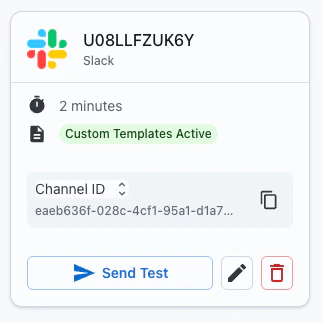
Find your channel ID on the channel card in the dashboard:
The required fields depend on the channel type:
| Channel | Required fields |
| ------------ | ------------------------------------- |
| **SMS** | Recipient phone number, wait time |
| **WhatsApp** | Recipient phone number, wait time |
| **Slack** | Slack member or channel ID, wait time |
| **Call** | Recipient phone number |
This saves the channel card and generates a unique **channel ID**.
***
## Use your channel card
Pass the channel ID in any Poku API request. No need to include `to`, `waitTime` — those are stored on the card.
```bash theme={null}
curl -X POST https://api.pokulabs.com/messages/ \
-H "Authorization: Bearer " \
-H "Content-Type: application/json" \
-d '{
"message": "Customer John is asking about the status of his car. When is it ready for pick-up?"
}'
```
Find your channel ID on the channel card in the dashboard:
 ***
## Advanced options
**Reply link** — SMS, WhatsApp, and Slack channels can include a reply link. Instead of replying via SMS or WhatsApp, the recipient clicks a link that takes them to the Poku dashboard to respond.
**Follow-up time** — How long Poku keeps listening after `waitTime` closes. Late replies are delivered to your configured webhook. See [Follow Up Time](/reference/voice-ai-follow-up-time).
**Outgoing message template** — Wrap your agent's message in fixed context before it's sent to the recipient.
**Message templates**
Templates let you add context around the message your agent sends — without changing the agent's prompt.
Example outgoing template:
```
Request from ABC Store: {{message}}. Please respond within {{waitTime}} seconds.
```
When your agent sends `"We need your delivery address to proceed."`, the recipient sees:
> *"Request from ABC Store: We need your delivery address to proceed. Please respond within 30 seconds."*
**Response and no-response templates**
By default:
* **Response:** `Human response: {{message}}`
* **No response:** `Human did not respond. Continue where you left off.`
These are what your agent reads in the HTTP response. You can customize them to trigger specific agent behaviors.
**Example:**
```
Human did not respond. Let the customer know no one is available for a transfer right now and offer to schedule a callback.
```
This lets you encode routing logic directly into the channel card — your agent acts on the no-response message without needing extra prompt instructions.
***
## What a channel card stores
| Field | Description |
| ----------------------------- | ---------------------------------------------------------- |
| `to` | The recipient — phone number, Slack ID, or WhatsApp number |
| `waitTime` | Seconds to hold the request open for a reply |
| `followUpTime` | Seconds to keep listening after `waitTime` closes |
| **Outgoing message template** | Wraps your `{{message}}` in custom context |
| **Response template** | How a reply is formatted back to your agent |
| **No-response template** | What your agent receives if no reply comes in |
***
## Advanced options
**Reply link** — SMS, WhatsApp, and Slack channels can include a reply link. Instead of replying via SMS or WhatsApp, the recipient clicks a link that takes them to the Poku dashboard to respond.
**Follow-up time** — How long Poku keeps listening after `waitTime` closes. Late replies are delivered to your configured webhook. See [Follow Up Time](/reference/voice-ai-follow-up-time).
**Outgoing message template** — Wrap your agent's message in fixed context before it's sent to the recipient.
**Message templates**
Templates let you add context around the message your agent sends — without changing the agent's prompt.
Example outgoing template:
```
Request from ABC Store: {{message}}. Please respond within {{waitTime}} seconds.
```
When your agent sends `"We need your delivery address to proceed."`, the recipient sees:
> *"Request from ABC Store: We need your delivery address to proceed. Please respond within 30 seconds."*
**Response and no-response templates**
By default:
* **Response:** `Human response: {{message}}`
* **No response:** `Human did not respond. Continue where you left off.`
These are what your agent reads in the HTTP response. You can customize them to trigger specific agent behaviors.
**Example:**
```
Human did not respond. Let the customer know no one is available for a transfer right now and offer to schedule a callback.
```
This lets you encode routing logic directly into the channel card — your agent acts on the no-response message without needing extra prompt instructions.
***
## What a channel card stores
| Field | Description |
| ----------------------------- | ---------------------------------------------------------- |
| `to` | The recipient — phone number, Slack ID, or WhatsApp number |
| `waitTime` | Seconds to hold the request open for a reply |
| `followUpTime` | Seconds to keep listening after `waitTime` closes |
| **Outgoing message template** | Wraps your `{{message}}` in custom context |
| **Response template** | How a reply is formatted back to your agent |
| **No-response template** | What your agent receives if no reply comes in |