> ## Documentation Index
> Fetch the complete documentation index at: https://docs.pokulabs.com/llms.txt
> Use this file to discover all available pages before exploring further.
# n8n Setup
> Connect Poku Inbox to an external agent brain (e.g., Retell.ai) via n8n.
If your AI agent already lives on another platform, you can wire Poku Inbox into it via n8n. This example uses [Retell.ai](https://retell.ai) as the agent brain.
 ***
## Prerequisites
Before setting up, grab your **Poku API key** from the [Poku dashboard](https://dashboard.pokulabs.com/). You'll need it to enable the agent toggle in your workflow.
***
## How it works
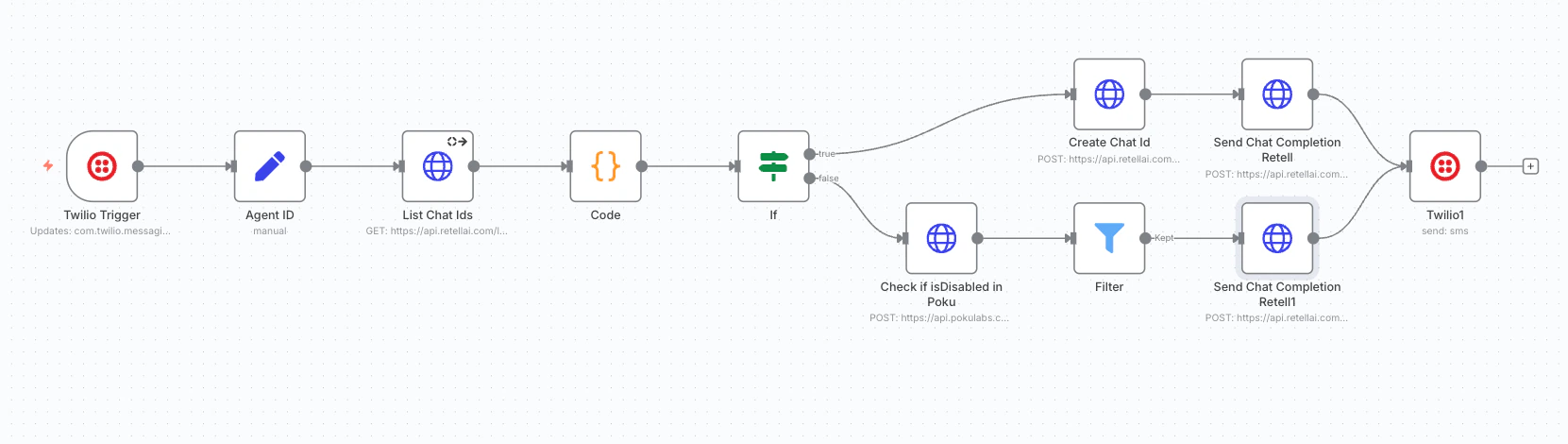
Incoming Twilio messages arrive at your n8n workflow.
The workflow checks whether a conversation already exists for the incoming phone number:
* **No existing conversation** — a new chat is created.
* **Existing conversation** — the chat is updated with the new message.
Poku checks whether the agent is enabled before forwarding the message to your Retell agent.
**Agent OFF** — the workflow stops; the message is not forwarded to the agent.
***
## Prerequisites
Before setting up, grab your **Poku API key** from the [Poku dashboard](https://dashboard.pokulabs.com/). You'll need it to enable the agent toggle in your workflow.
***
## How it works
Incoming Twilio messages arrive at your n8n workflow.
The workflow checks whether a conversation already exists for the incoming phone number:
* **No existing conversation** — a new chat is created.
* **Existing conversation** — the chat is updated with the new message.
Poku checks whether the agent is enabled before forwarding the message to your Retell agent.
**Agent OFF** — the workflow stops; the message is not forwarded to the agent.
 **Agent ON** — the message continues to your Retell agent, which generates and sends a reply.
 ***
## Import the workflow
Download the n8n workflow and import it into your n8n account.
After importing, replace all placeholder credentials with your own Twilio, Retell, and Poku API key details.
***
## Import the workflow
Download the n8n workflow and import it into your n8n account.
After importing, replace all placeholder credentials with your own Twilio, Retell, and Poku API key details.